AITRADINGFOREX ← Previous ATF Post
Official ATF Guide

Complete Guide to Locking ATF & Receiving Bonus

If you want to Lock your ATF and benefit from the corresponding Bonus, read this guide completely and carefully before proceeding. All Lock information must be entered exactly according to the conditions below; otherwise, your Lock may not qualify for the Bonus.

Published September 15, 2026 · ATF Team
10,000 ATFMinimum qualifying amount
3 MonthsVIP 1 · 2X Bonus
1 YearVIP 2 · 3X Bonus
10 YearsVIP 3 · 4X Bonus
Important: Before confirming any blockchain transaction, verify the website address, Jetton Address, wallet address, amount, Unlock date, and every field carefully. Blockchain transactions can be irreversible.

01 — Where to Lock Your ATF

Use the following Lock platform:

Open the website, connect your wallet, and proceed to the Lock section.

Where to Select Your VIP Level

Your VIP section is available directly inside the ATF Mini App:

ATF Mini App → Profile → VIP

Select your desired VIP category according to your Lock amount and Lock duration. After the Lock is completed correctly, the ATF / ATF Miner system automatically checks the Lock information and calculates the corresponding Level and Bonus based on the applicable conditions.

02 — What Information Should You Enter?

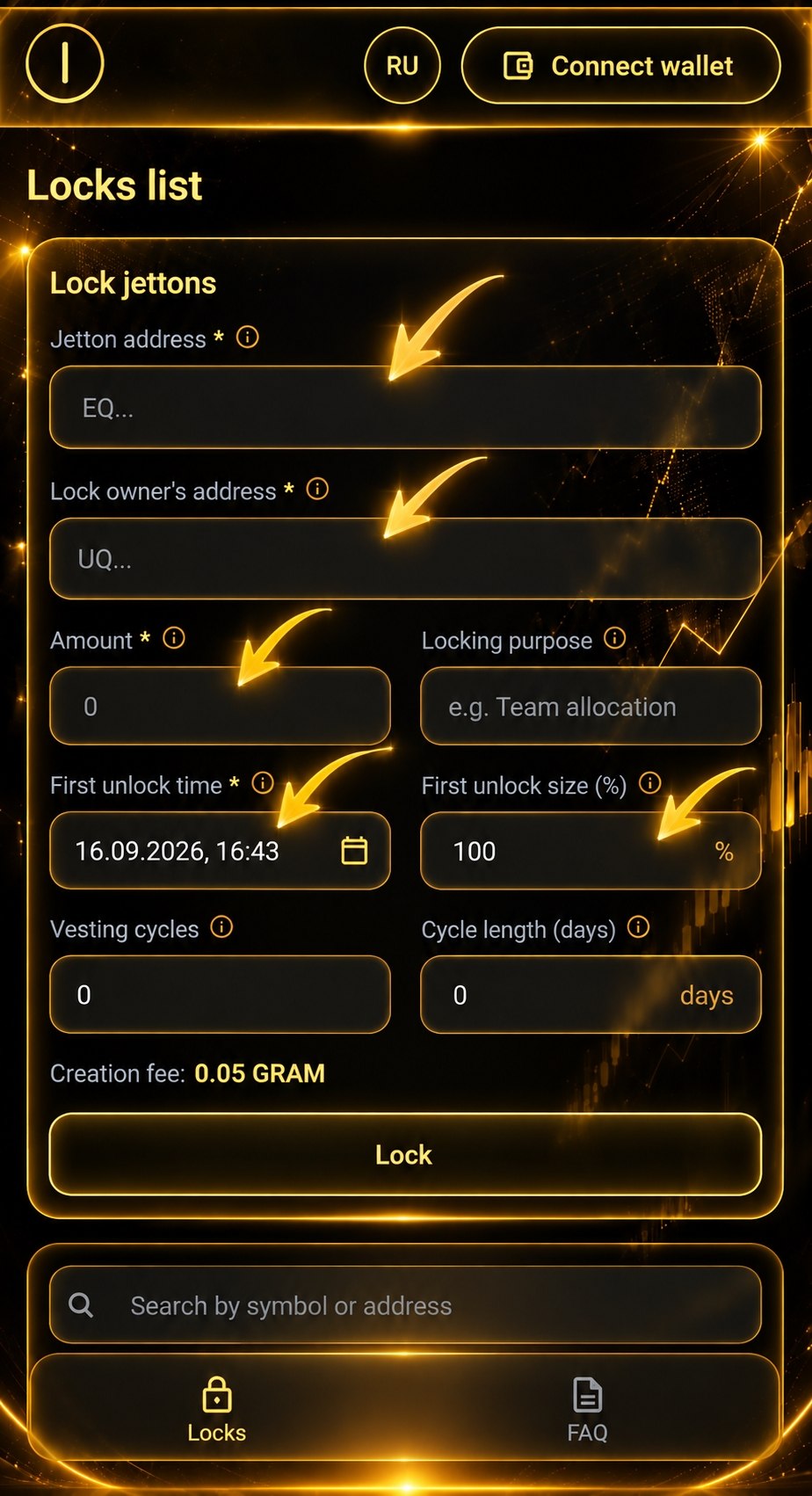
On the Lock page, fill in only the fields below and leave all other fields completely empty.

Correct Field Setup
Example of the correct ATF lock fields
Fill only the required fields shown in the guide and leave the remaining options empty.

Jetton Address

EQANcW45W0Tp91bzvHayaPO6-6hf1Lm4XlWZ4rN6L5ofPWdb

Enter the ATF Jetton contract address exactly as shown above. Check it several times before confirming the Lock.

Lock Owner’s Address

Enter your own wallet address—the wallet that will own the locked ATF position.

Amount

Enter the amount of ATF you want to Lock. The minimum amount required to qualify is 10,000 ATF.

First Unlock Time

Select the date when your ATF will become eligible to Unlock. The Lock duration must meet the minimum requirement of your desired VIP Level.

First Unlock Size (%)

100%
Do not change or enter anything in the other fields. Leave all other options completely empty.
03 — Your ATF Lock Is Fully On-Chain

Your ATF is locked On-Chain on the blockchain. You are not giving your ATF to another person for safekeeping.

The Lock is performed through a blockchain transaction and the Lock mechanism, and the relevant information is recorded On-Chain so it can be publicly viewed and verified on the blockchain.

This means your Lock is not simply a number or record inside a bot; the information related to the locked position is recorded directly on the blockchain.

After Locking, an NFT Is Added to Your Wallet

After successfully completing the Lock, an NFT related to your Lock position is added to your own wallet. This NFT represents your Lock position and remains in your own wallet.

Lock ATF on the blockchain → Lock recorded On-Chain → Lock NFT appears in your own wallet

As long as the Lock conditions remain active, your locked ATF stays locked according to the contract mechanism, and no other person becomes the owner of your ATF.

04 — VIP Levels & Bonus Multipliers

Your Bonus depends on how long you Lock your ATF.

VIP 1

3 Months

2X

Minimum Lock duration

VIP 2

1 Year

3X

Minimum Lock duration

VIP 3

10 Years

4X

Minimum Lock duration

The longer your Lock period and the higher your VIP Level, the higher your Bonus multiplier.

05 — What Exactly Does the Bonus Do?

The Bonus is NOT a withdrawable balance. You cannot withdraw, transfer, or cash out the Bonus.

The purpose of the Bonus is to increase your Mining power and Mining speed during the period in which your ATF remains locked.

For example, if your Lock qualifies for a 2X Bonus, the relevant Mining calculations use the 2X multiplier while your qualifying Lock remains active.

The Bonus should therefore not be confused with real, withdrawable ATF. It is a temporary benefit designed to increase your Mining power during the Lock period.

06 — How Locking Affects Your Level

When you Lock your ATF, your Level does not decrease. The qualifying ATF you Lock is added to the basis used for your Level, which can help increase your Level.

Lock ATF → Level does not decrease → Qualifying amount is added to your Level basis → Your Level may increase → Bonus increases Mining power

07 — A Simple Example

Suppose you Lock 10,000 ATF for at least 3 months. You meet the requirements for VIP 1 and receive a 2X Bonus.

10,000 × 2 = 20,000

This does not mean you receive 20,000 withdrawable ATF. You still have 10,000 original ATF locked; the Bonus is used only to increase your Mining power during the Lock period.

During these three months, your Lock is recorded on the blockchain, and the NFT representing your Lock position remains in your own wallet.

At the end of the Lock period:
🔓 Your original 10,000 ATF becomes unlocked.
💰 The same 10,000 ATF becomes available again.
❌ The Bonus associated with that Lock is removed.

08 — What Happens After Unlock?

When the Lock period ends and the Unlock conditions are met, the original ATF you locked becomes unlocked.

  • Lock 10,000 ATF → 10,000 ATF becomes available when unlocked.
  • Lock 50,000 ATF → 50,000 ATF becomes available when unlocked.

The Bonus works differently: it is not withdrawable and is removed when your ATF is unlocked. The benefit of the Bonus is the increased Mining power and speed during the Lock period.

Original ATF → Available after Unlock ✅   |   Bonus → Removed at Unlock ❌

09 — Where Are Your Assets?

You are not giving your ATF to another person. The Lock is performed On-Chain, and the transaction and relevant Lock information can be viewed and verified on the blockchain.

After the Lock is completed, the NFT representing your Lock position is also held in your own wallet.

Your Assets → Locked On-Chain → NFT in Your Wallet → Lock Period Ends → Same Amount of ATF Unlocks

10 — Automatic Verification by ATF Miner

The ATF / ATF Miner system automatically checks your Lock information. Based on the amount of ATF and the duration of the Lock, your corresponding Level and Bonus are calculated.

This is why it is extremely important to enter the correct amount, Lock date, and all other required information.

ATF Mini App → Profile → VIP

11 — Minimum & Maximum Lock Amount

The minimum qualifying amount is 10,000 ATF.

There is no maximum Lock amount under these conditions, so you may Lock a larger amount of ATF if you wish.

12 — Check Everything Before Locking

✓ Correct Lock platform: https://jvault.xyz/locker
✓ Jetton Address: EQANcW45W0Tp91bzvHayaPO6-6hf1Lm4XlWZ4rN6L5ofPWdb
✓ Lock Owner’s Address is your correct wallet address.
✓ Amount is at least 10,000 ATF.
✓ First Unlock Time meets the minimum duration for your desired VIP Level.
✓ First Unlock Size is set to 100%.
✓ All other fields are left completely empty.
If any specified condition is not followed—for example, the wrong Jetton is selected, the amount is below the required minimum, or the Lock duration does not meet the selected Level requirement—then under these conditions your ATF will be treated as regular ATF and will not qualify for the Bonus.

13 — Very Simple Summary

  1. Open the Lock Platform: https://jvault.xyz/locker
  2. Enter the correct ATF Jetton Address.
  3. Complete the Lock correctly: wallet address, amount, Unlock date, First Unlock Size 100%; leave other fields empty.
  4. Your Lock is On-Chain.
  5. You receive an NFT representing your Lock position in your own wallet.
  6. Select your VIP category: ATF Mini App → Profile → VIP.
  7. Your Level can increase because qualifying locked ATF is added to the Level basis.
  8. Your Bonus increases Mining power while the qualifying Lock is active.
  9. At Unlock, the same amount of original ATF becomes available again and the Bonus is removed.
Use jVault Locker 🌐 → Lock ATF On-Chain ⛓️ → Receive the Lock NFT 🎁 → Select your VIP category 👑 → Your Level may increase 📈 → Benefit from increased Mining power ⚡ → At the end of the Lock period, the same amount of original ATF becomes available again and the Bonus is removed 🔓